
Every couple of weeks, your graphics card software pops up a little message saying a new driver is ready. Most people either click install without reading or ignore it until the heat death of the universe. Neither is wrong, exactly. But a few minutes of reading can tell you whether this one fixes the game you’re playing, or breaks it.
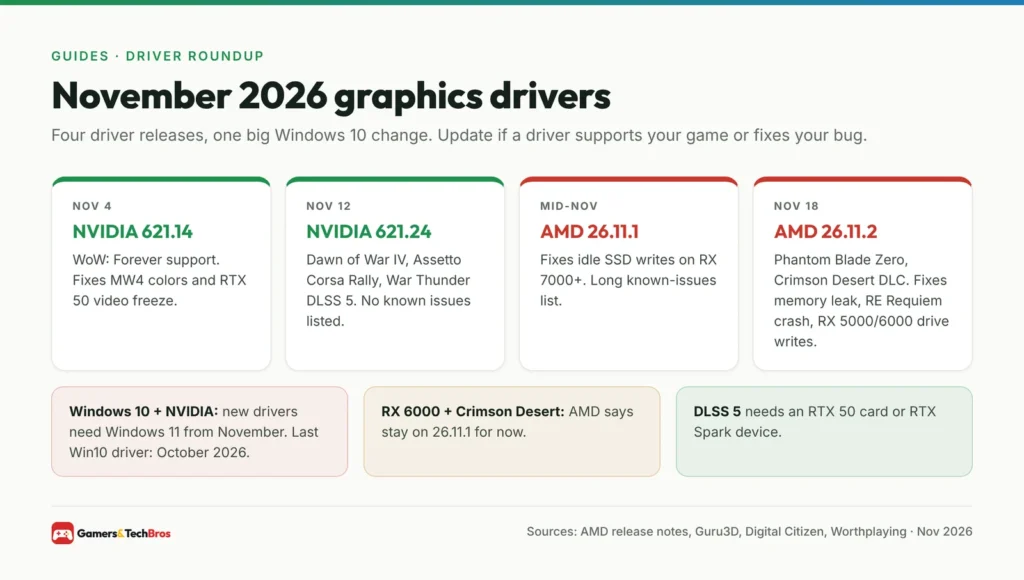
November 2026 was a busy month. NVIDIA put out two Game Ready drivers and ended new drivers for Windows 10. AMD shipped two Adrenalin updates, one of them fixing a bug that had been quietly writing to people’s SSDs. Here’s what changed and who should bother.
The big one: NVIDIA drivers now need Windows 11
If you have an NVIDIA card and still run Windows 10, read this first. According to Guru3D, NVIDIA’s last Game Ready and Studio drivers for Windows 10 came out in October 2026. From November, new driver packages require Windows 11.
Your PC won’t stop working. The last Windows 10 driver keeps running the games it already supports. You just won’t get new game optimizations, new features or fixes for bugs found later. NVIDIA plans quarterly security updates for Windows 10 for three years, through October 2029, according to the same report. A second Guru3D story, sourced to Hong Kong site HKEPC, gives a less generous picture of those security updates, so keep an eye on NVIDIA’s own notes.
Microsoft ended standard support for Windows 10 on October 14, 2025, so NVIDIA gave Windows 10 gamers about an extra year. If you’ve been putting off the upgrade, this is a good nudge.
AMD’s November drivers still support Windows 10 64-bit (version 21H2 and later) as well as Windows 11, according to AMD’s release notes.
NVIDIA 621.14, November 4
This one landed in time for World of Warcraft: Forever, which launched the same day, according to Guru3D’s download page. It also prepared PCs for DLSS 5 updates to Hogwarts Legacy and War Thunder, and DOOM: The Dark Ages’ Revelations update.
It fixed wrong colors in Call of Duty: Modern Warfare 4, and a bug where video playback froze or went black on some RTX 50 series and RTX Spark systems after driver 621.01. That second fix had already shipped in an optional 621.12 hotfix.
Who should update: Modern Warfare 4 players who saw odd colors, anyone who had the video playback freeze, and WoW players.
NVIDIA 621.24, November 12
This driver arrived with War Thunder’s Eagle’s Shadow update, which added DLSS 5, NVIDIA’s newest version of its upscaling tech. Worthplaying says DLSS 5 works on all RTX 50 series cards, RTX Spark devices and GeForce NOW’s Ultimate tier. If you have an older RTX card, you won’t get it.
Digital Citizen reports that 621.24 also adds optimizations and DLSS 4.5 Super Resolution support for Warhammer 40,000: Dawn of War IV and Assetto Corsa Rally, and extends DLSS 5 to Where Winds Meet. NVIDIA didn’t publish performance numbers for those. The fixes are mostly for creators and specific laptops, including an OptiX denoiser problem in Chaos Vantage and blank Netflix playback on the ASUS ProArt P16. Digital Citizen says NVIDIA listed no known issues.
Who should update: Dawn of War IV, Assetto Corsa Rally and War Thunder players, and anyone with an RTX 50 card who wants to try DLSS 5.
AMD Adrenalin 26.11.1, mid-November
The headline fix here is a strange one. Some Radeon cards were causing a lot of writes to the main system drive while the PC sat idle, and when moving or resizing windows. AMD’s 26.11.1 release notes say this is fixed for the RX 7000 series and newer. Unneeded writes don’t break anything right away, but SSDs have a limited write life, so it’s a fix worth having.
The known issues list is long. It includes crashes in Assassin’s Creed Black Flag Resynced on RX 7000 cards, driver timeouts in War Thunder on RX 5000 cards, and hair corruption in Phantom Blade Zero on RX 9000 cards.
AMD Adrenalin 26.11.2, November 18
This is the one most Radeon owners should end up on. AMD’s 26.11.2 notes add support for Phantom Blade Zero and Crimson Desert’s Charting the Unknown expansion, and fix the idle drive writes for RX 5000 and RX 6000 cards on Windows 10 too, as Guru3D noted.
It also fixes a memory leak that made apps open slower over time on RX 5000 and newer, the Phantom Blade Zero hair problem, the War Thunder timeouts, a first-launch crash in Resident Evil Requiem, OBS Studio crashes on RX 9000 cards, and Smart Access Memory switching itself off after install on Windows 10.
One catch. AMD lists Crimson Desert failing to launch on RX 6000 cards as a known issue, and advises those players to install 26.11.1 instead. The Assassin’s Creed and Cyberpunk 2077 known issues are still there too. AMD also says this package doesn’t support handheld devices.
Who should update: almost every Radeon owner, except RX 6000 owners playing Crimson Desert, who should stay on 26.11.1 for now.
Should you update at all?
A simple rule works for most people. Update when a driver adds support for a game you play, fixes a bug you have, or when it’s been a few months. Skip it if your PC runs perfectly and the notes don’t mention anything you use, especially if the known issues include your favorite game.
If a new driver causes trouble, you can always go back. Both NVIDIA and AMD keep older drivers on their websites, and a clean install with the option to reset settings usually sorts out weird leftovers.
We’ll do the same roundup next month. With any luck, December’s notes will be a little shorter.
How we researched this guide: the details come from AMD’s official release notes for Adrenalin 26.11.1 and 26.11.2, Guru3D’s driver pages and news stories, Digital Citizen’s summary of NVIDIA 621.24 and Worthplaying’s report on NVIDIA’s November 12 driver, all checked on November 28, 2026. We could not open NVIDIA’s own release notes for this roundup, so the 621.24 version details come from Digital Citizen. We did not install or test these drivers.